
Automated Polymarket AI Bot: Let Claude Analyse Markets and Trade for You
A Python bot that sends a Polymarket question to Claude for analysis. Claude researches it, forms a verdict, and the bot trades based on its confidence.
A Polymarket bot that scans markets and filters by volume is useful, but it still relies on hard-coded rules to decide what to buy. What if the bot could read a market question, research it, and form its own opinion before placing a trade? That is what happens when you wire Claude's API into the pipeline: the bot fetches a prediction market, sends the question to an LLM that searches the web and reasons about it, then places or skips the bet based on the model's confidence.
The result is a single Python script, roughly 180 lines, that turns any Polymarket market into an AI-evaluated trading decision. You paste a market URL, run the script, and Claude handles the analysis. The prompt is deliberately generic: it works on crypto, politics, sports, or anything else Polymarket lists.
This article picks up where the Polymarket trading bot tutorial left off. That bot found markets through rule-based scanning; this one reasons about them.
All resources for this tutorial:
- Full bot script — polymarket_ai_bot.py on GitHub
- Python SDK — Polymarket Python SDK
- Polymarket documentation — docs.polymarket.com
- Anthropic Claude API — Models Overview
- Tool use docs — Tool Use with Claude
- Web search docs — Web Search Tool
- API fundamentals — Polymarket API Python Tutorial
- Previous bot article — Polymarket Trading Bot with Python
- Video walkthrough — Polymarket AI Trading Bot with Claude
Setup and Credentials
The bot needs three API credentials to operate: two from Polymarket (private key and wallet address) and one from Anthropic (Claude API key). All three are stored in a .env file in the same directory as the script, loaded at startup via python-dotenv, a lightweight library that reads key-value pairs from a file and exposes them as environment variables.
Create a .env file in the same directory as the script and add your values:
POLYMARKET_PRIVATE_KEY=your-private-key
POLYMARKET_FUNDER_ADDRESS=your-wallet-address
ANTHROPIC_API_KEY=your-anthropic-api-key
These values grant full access to your Polymarket funds and your Claude API account. Keep them out of version control.
Getting Your Polymarket Credentials
Polymarket runs on the Polygon network. Your account has two pieces of information the bot needs: a private key (to sign transactions) and a wallet address (to identify your account). How you retrieve these depends on your account type.
Start by logging in to polymarket.com. Click on your profile icon in the top-right corner to open the settings dropdown.
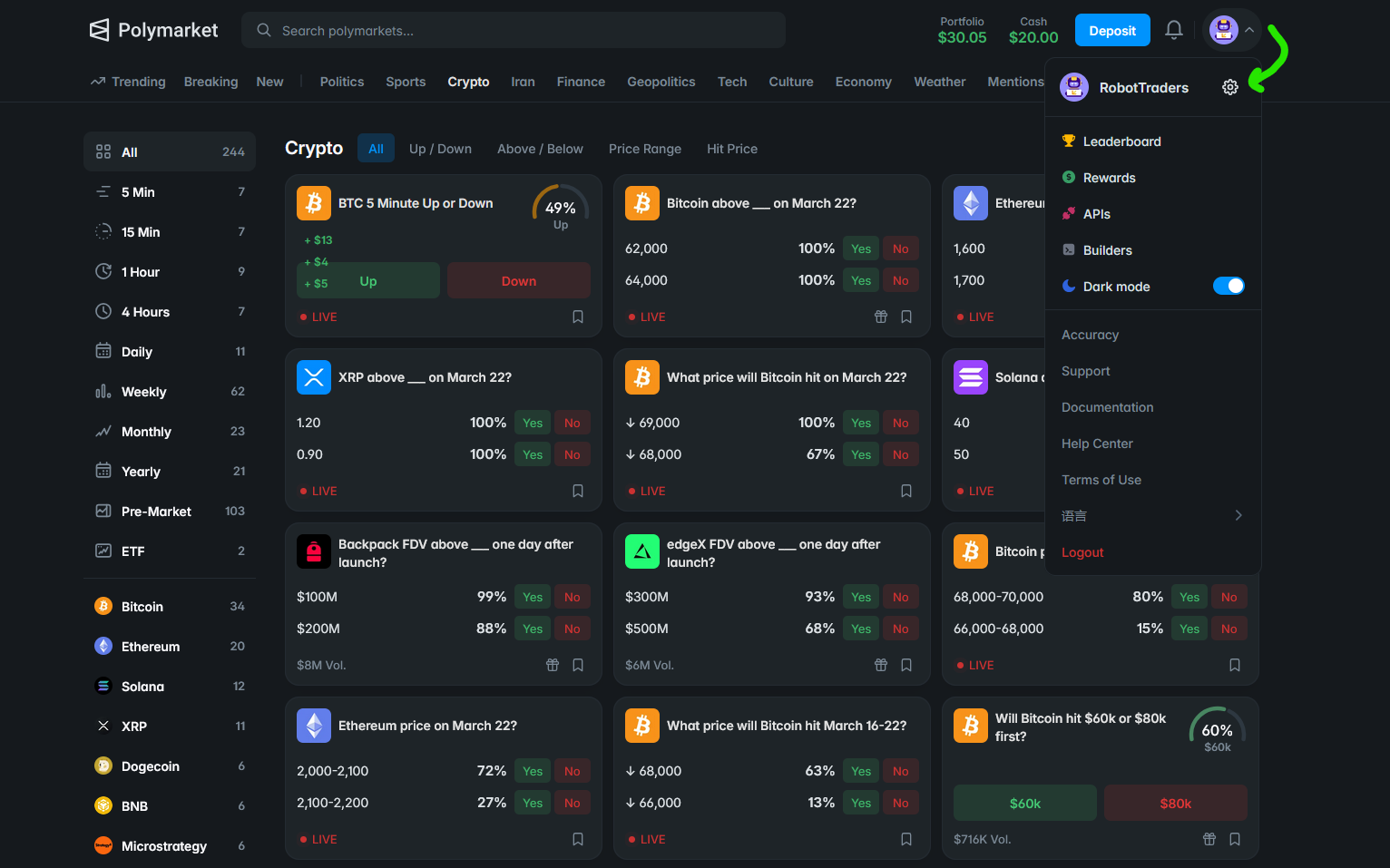
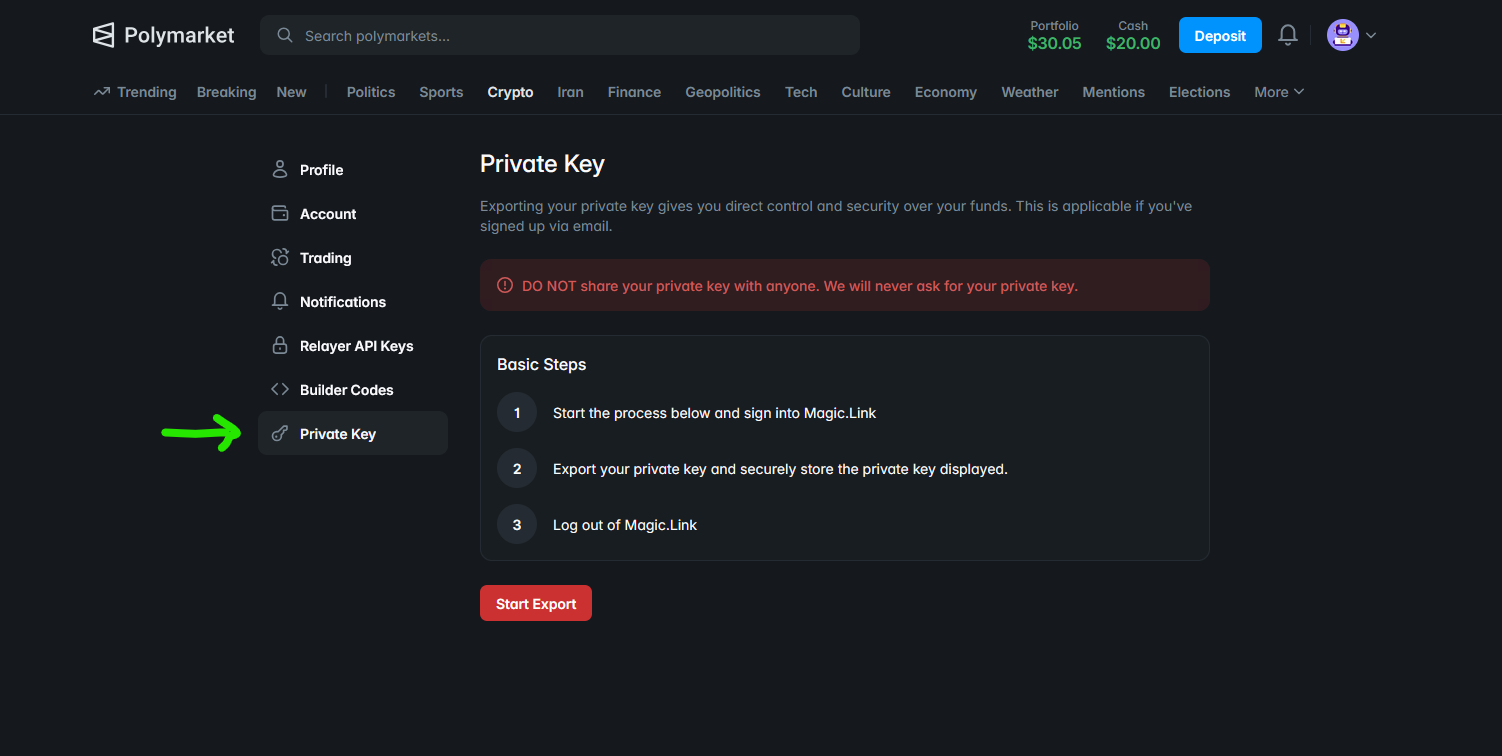
If you created your account with an email address (the most common setup), your private key is managed by Magic.Link. To export it:
- Open Settings and select Private Key in the sidebar
- Click Start Export and sign into Magic.Link when prompted
- Copy the displayed key into your
.envfile asPOLYMARKET_PRIVATE_KEY - Log out of Magic.Link when done
If you use an external wallet (MetaMask, Ledger, or any hardware wallet), your private key is stored in that wallet, not on Polymarket. Export it from your wallet software directly. The process varies by wallet, so consult your wallet's documentation.
The SIGNATURE_TYPE variable in the script must match your account type:
| Value | Account Type |
|---|---|
| 0 | EOA wallet (MetaMask, hardware wallet) |
| 1 | Email account (Magic.Link) |
| 2 | Browser wallet proxy |
The script defaults to 1 (email). Change it if you use a different wallet type.
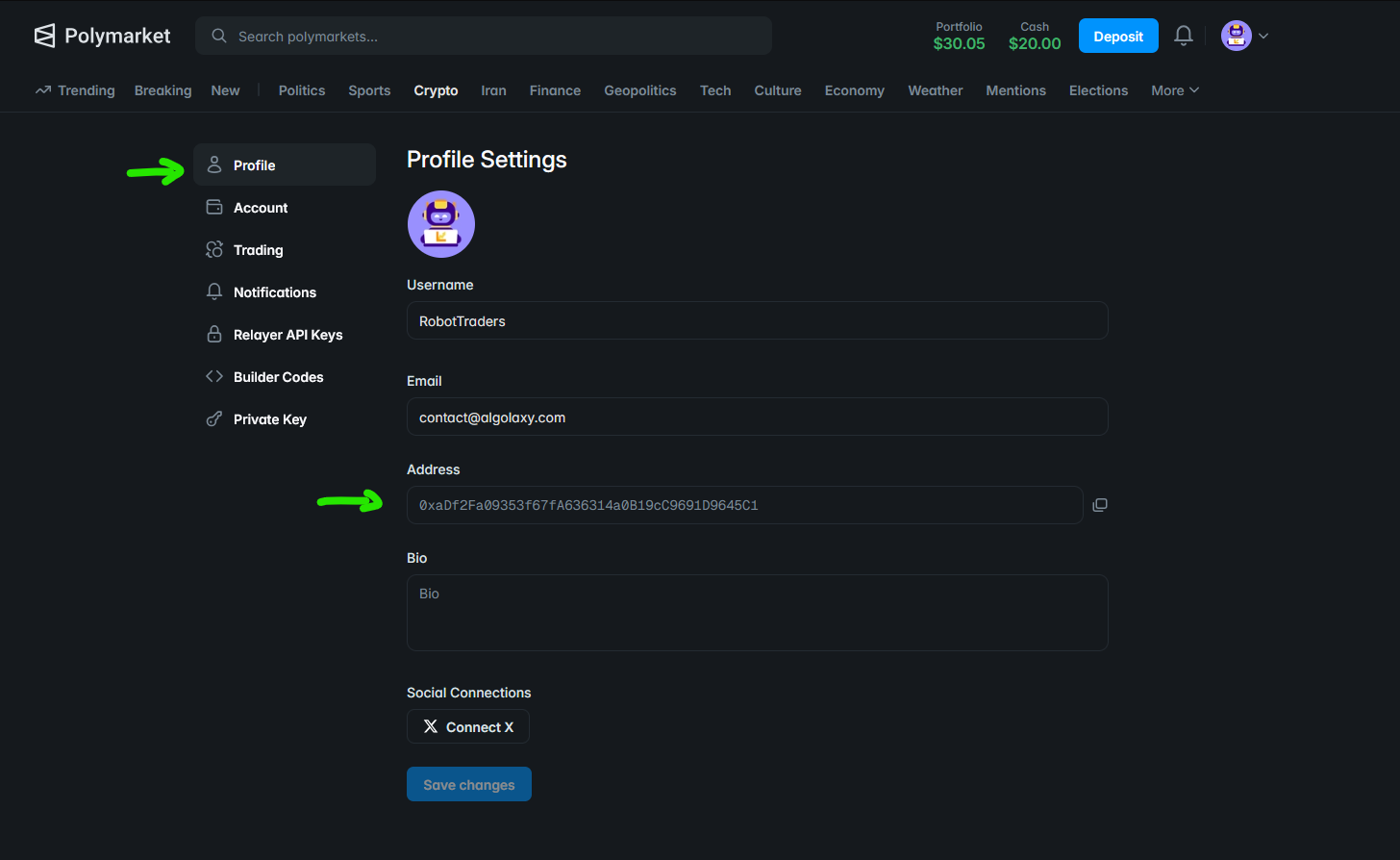
To get your wallet address (POLYMARKET_FUNDER_ADDRESS), go to your Profile Settings. Your address appears below your username as a full 0x... string. Copy it into your .env file.
Getting Your Claude API Key
The new credential for this bot is ANTHROPIC_API_KEY. This is what authenticates your requests to Claude's API.
- Search for "Claude console" in your browser (it is generally one of the first results) or go directly to platform.claude.com
- Sign in or create an account
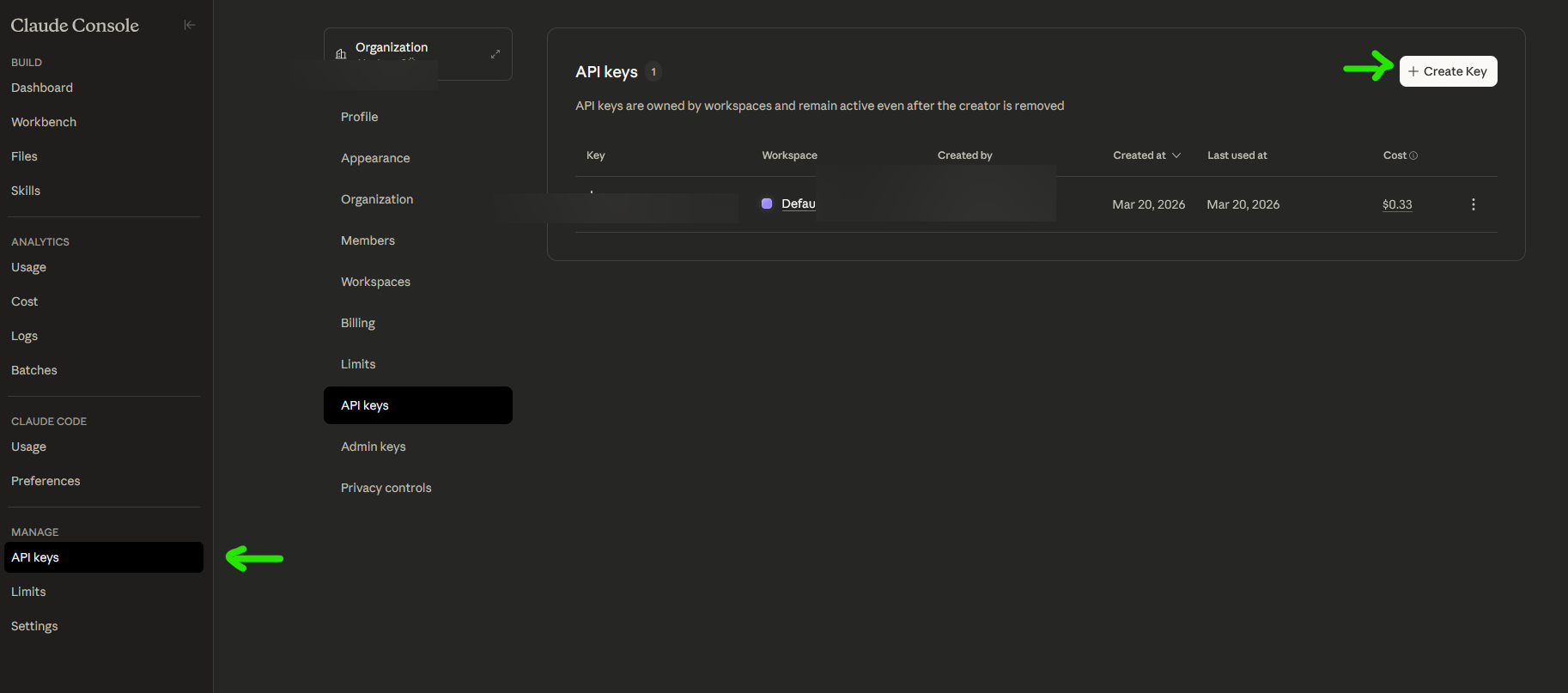
- Navigate to API Keys in the left sidebar
- Click Create Key and give it a descriptive name
- Copy the key immediately into your
.envfile asANTHROPIC_API_KEY. It is only shown once
Claude API requests are paid per use. Each call to ask_claude costs a small amount depending on the model and whether web search is enabled. You will need to purchase credits before the bot can query Claude. Check your balance under Settings → Plans & Billing and top up if needed.
Trading Parameters
After credentials, the script defines the configuration constants that control the bot's behaviour:
MARKET_URL = "https://polymarket.com/event/bitcoin-above-on-march-21/bitcoin-above-72k-on-march-21"  # Paste the market URL here
BET_AMOUNT = 5.0
# DRY_RUN = True
DRY_RUN = False

MIN_CONFIDENCE = "Medium"  # Minimum claude confidence to place a bet (Low, Medium, High)
# MIN_CONFIDENCE = "Low"   # Bet on any confidence level
# MIN_CONFIDENCE = "High"  # Only bet if Claude is highly confident

ANTHROPIC_MODEL = "claude-sonnet-4-6"  # https://docs.anthropic.com/en/docs/about-claude/models
# ANTHROPIC_MODEL = "claude-opus-4-6"
WEB_SEARCH_MAX = 3  # Max web searches Claude can do (0 to disable)
MARKET_URL is the Polymarket URL you want the bot to analyse. Navigate to the market on polymarket.com and copy the URL directly from your browser's address bar. Paste it into the script as-is. One market per run. No need to hunt for condition IDs or token identifiers; the bot extracts what it needs from the URL and resolves everything through the API.
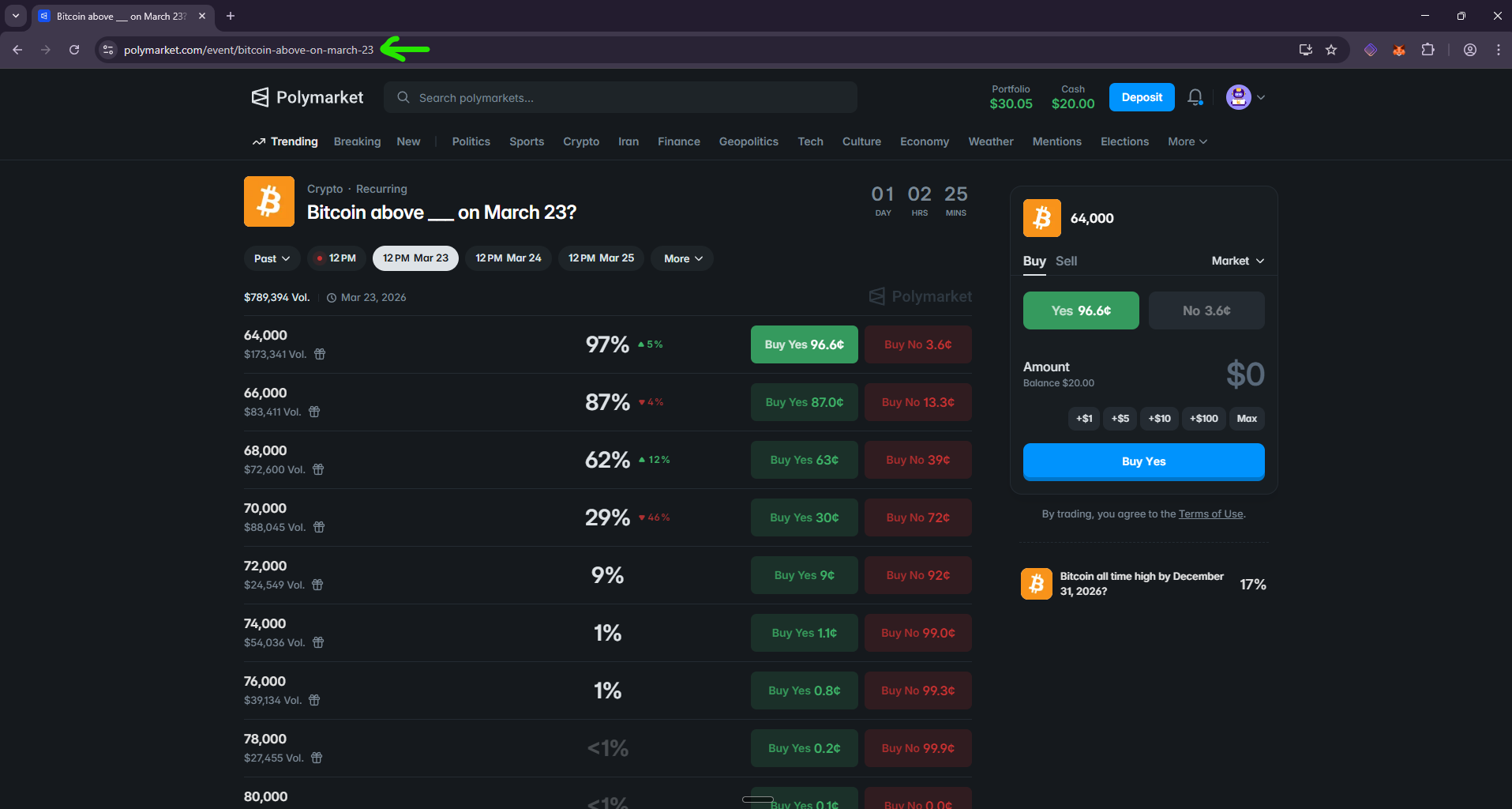
If the market is an event with multiple sub-markets (like the example above showing several price thresholds), the bot detects this automatically, lists all available sub-markets with their URLs, and stops. You then copy the specific sub-market URL you want, paste it into MARKET_URL, and run again.
DRY_RUN controls whether the bot places real trades. When set to True, the bot runs the full pipeline (fetch market, query Claude, evaluate confidence) but stops before sending the order. It prints what it would do instead. Set it to False to trade with real funds. The script shows both options with the active one uncommented, so switching is a one-line change.
MIN_CONFIDENCE acts as a gate between Claude's opinion and your money. If Claude returns "Low" confidence and your threshold is "Medium", the bot skips the trade. Three presets are shown in the code; uncomment the one that matches your risk appetite.
ANTHROPIC_MODEL lets you swap between Claude models. Sonnet is fast and cheap; Opus is slower but reasons more deeply. The choice depends on whether you optimise for speed or depth of analysis.
WEB_SEARCH_MAX controls how many web searches Claude can perform while reasoning about the question. Set it to 0 to disable web search entirely and rely on Claude's training data alone.
Prompt and Tool Definition
The prompt is the shortest part of the script, and that is intentional:
PROMPT = """I'm going to ask you a question. Based on your knowledge, reasoning,
and any web research you can do, answer by calling the provided tool.

{question}"""
No market category, no crypto-specific instructions, no hinting at what the answer should be. The {question} placeholder gets replaced with the exact market question from Polymarket (e.g., "Will BTC hit $150K by June 2026?"). Claude reads the question, interprets it however it sees fit, optionally searches the web for recent information, and forms a judgement.
This generic approach means the same prompt works on any market. A crypto question triggers crypto research; a politics question triggers political research. Claude adapts because it understands the question, not because the prompt tells it what domain to care about.
It is also intentionally minimal because it serves as a starting point. The prompt is where you encode your edge: add domain-specific instructions, reference particular data sources, constrain the reasoning style, or inject context about your trading thesis. The generic version shown here is a template; what you put in the prompt is your strategy.
The real structure comes from the tool definition:
TOOL_DEFINITION = {
    "name": "answer",
    "description": "Submit a structured answer to the question.",
    "input_schema": {
        "type": "object",
        "properties": {
            "decision": {"type": "string", "enum": ["Yes", "No"]},
            "confidence": {"type": "string", "enum": ["Low", "Medium", "High"]},
            "reasoning": {"type": "string", "description": "2-3 sentence rationale"},
        },
        "required": ["decision", "confidence", "reasoning"],
    },
}
Tool use is an Anthropic API feature that lets you define a function schema and have Claude "call" it with structured arguments. Instead of returning free-text prose that you would need to parse, Claude returns a JSON object matching the schema exactly: a decision (Yes or No), a confidence level (Low, Medium, or High), and a short reasoning string.
This solves a common problem with LLM-based systems. Without tool use, you would send a prompt like "Answer Yes or No" and then try to extract the answer from a paragraph of text. With tool use, the response is machine-readable by design. The bot can check result["decision"] and result["confidence"] directly, with no string parsing required.
Fetching Market Data from Polymarket
Two functions handle all communication with Polymarket: one to fetch the market, one to place orders.
The get_market function takes the full Polymarket URL, extracts the slug (the last segment of the URL path), and resolves the market through the Gamma API:
def get_market(url):
    slug = url.rstrip("/").split("/")[-1]

    r = requests.get("https://gamma-api.polymarket.com/events", params={"slug": slug})
    if r.status_code != 200:
        raise Exception(f"Polymarket API error {r.status_code}: {r.text}")
    events = r.json()

    if events and events[0].get("markets"):
        markets = events[0]["markets"]
        if len(markets) > 1:
            print(f"{ts()} This event has multiple markets:\n")
            for m in markets:
                print(f"  - {m['question']}")
                print(f"    https://polymarket.com/market/{m['slug']}\n")
            print(f"{ts()} Copy one of the URLs above into MARKET_URL and run again.")
            raise SystemExit()
        m = markets[0]
    else:
        r = requests.get("https://gamma-api.polymarket.com/markets", params={"slug": slug})
        if r.status_code != 200:
            raise Exception(f"Polymarket API error {r.status_code}: {r.text}")
        markets = r.json()
        if not markets:
            raise ValueError(f"No market found for: {slug}")
        m = markets[0]

    prices = json.loads(m.get("outcomePrices", "[]"))
    tokens = json.loads(m.get("clobTokenIds", "[]"))
    return {
        "question": m["question"],
        "yes_price": float(prices[0]),
        "no_price": float(prices[1]),
        "yes_token_id": tokens[0],
        "no_token_id": tokens[1],
    }
The function uses a two-step resolution approach. It first queries the /events endpoint with the slug. If the slug matches an event that contains a single market, the function returns that market's data directly. If the event contains multiple sub-markets (common for multi-outcome questions like "Which crypto will hit X first?"), the bot lists all of them with their individual URLs and exits, so you can pick the specific one you want.
If the /events endpoint returns nothing (which happens when the URL points to an individual market rather than an event), the function falls back to the /markets endpoint. This two-step approach handles both URL formats Polymarket uses.
The order function is a simplified version of the previous bot's implementation. That version handled both market and limit orders with a configurable side; this one only needs market orders on the BUY side, so it takes just a client, token_id, and amount. It sends a Fill-or-Kill market order through py-clob-client, the open-source Python wrapper for Polymarket's order book:
def place_order(client, token_id, amount):
    order = MarketOrderArgs(token_id=token_id, amount=amount, side=BUY, order_type=OrderType.FOK)
    signed = client.create_market_order(order)
    return client.post_order(signed, OrderType.FOK)
The order is created, cryptographically signed with your private key, then submitted. If you have followed the API fundamentals tutorial, this two-step signing process is familiar.
The AI Layer: Querying Claude
One function sends the market question to Claude's API and returns a structured decision. This is the core of the bot:
def ask_claude(question):
    prompt = PROMPT.format(question=question)
    headers = {
        "x-api-key": ANTHROPIC_API_KEY,
        "anthropic-version": "2023-06-01",
        "content-type": "application/json",
    }
    tools = [TOOL_DEFINITION]
    if WEB_SEARCH_MAX > 0:
        tools.insert(0, {"type": "web_search_20250305", "name": "web_search", "max_uses": WEB_SEARCH_MAX})

    payload = {
        "model": ANTHROPIC_MODEL, "max_tokens": 1024,
        "tools": tools,
        "messages": [{"role": "user", "content": prompt}],
    }
    r = requests.post("https://api.anthropic.com/v1/messages", headers=headers, json=payload, timeout=60)
    if r.status_code != 200:
        raise Exception(f"Claude API error {r.status_code}: {r.text}")
    for block in r.json().get("content", []):
        if block.get("type") == "tool_use" and block.get("name") == "answer":
            return block["input"]
    raise ValueError("Claude did not return an answer tool call")
The tools list is built conditionally. The custom answer tool is always included. Anthropic's built-in web search, a server-side tool that lets Claude search the internet during its reasoning, is only added when WEB_SEARCH_MAX is greater than zero. When Claude encounters a question like "Will BTC hit $150K by June 2026?", it can pull up recent price data, news, and analyst opinions before forming a view. The max_uses parameter caps how many searches Claude can perform per request. Set WEB_SEARCH_MAX to 0, and the model relies on its training data alone, with no web search tool in the payload at all.
After Claude finishes reasoning (and optionally searching the web), it calls the answer tool with its structured response. The function loops through the API's content blocks (text blocks for reasoning, server_tool_use blocks for web searches, tool_use blocks for tool calls), finds the one where name equals "answer", and returns its input field: the {"decision": "Yes", "confidence": "High", "reasoning": "..."} object that matches the tool schema.
If Claude does not call the answer tool (which should not happen given the prompt, but defensive coding matters), the function raises an error instead of silently returning nothing.
Trading crypto since 2011. Fully regulated. Never hacked. Get 15 USDT in BTC for free.
Orchestration: The Main Function
The main function ties the pieces together in a sequential flow:
CONFIDENCE_RANK = {"Low": 1, "Medium": 2, "High": 3}

def main():
    print(f"\n{ts()} Fetching market...")
    try:
        market = get_market(MARKET_URL)
    except Exception as e:
        print(f"{ts()} Polymarket error: {e}")
        return
    print(f"{ts()} Market: \"{market['question']}\"")
    print(f"{ts()} Current odds: Yes {market['yes_price']*100:.1f}% | No {market['no_price']*100:.1f}%")

    print(f"\n{ts()} Asking Claude...")
    try:
        result = ask_claude(market["question"])
    except Exception as e:
        print(f"{ts()} Claude error: {e}")
        return

    decision = result["decision"]
    confidence = result["confidence"]
    reasoning = result["reasoning"]

    print(f"\n{ts()} Reasoning: {reasoning}")
    print(f"{ts()} Decision: {decision}")
    print(f"{ts()} Confidence: {confidence}")

    if CONFIDENCE_RANK[confidence] < CONFIDENCE_RANK[MIN_CONFIDENCE]:
        print(f"\n{ts()} Confidence too low ({confidence} < {MIN_CONFIDENCE}). Skipping bet.")
        return

    token_id = market["yes_token_id"] if decision == "Yes" else market["no_token_id"]
    if DRY_RUN:
        print(f"\n{ts()} DRY RUN — would bet ${BET_AMOUNT:.2f} on {decision}")
    else:
        client = ClobClient("https://clob.polymarket.com", key=PRIVATE_KEY, chain_id=137,
                            signature_type=SIGNATURE_TYPE, funder=FUNDER_ADDRESS)
        client.set_api_creds(client.derive_api_key())
        print(f"\n{ts()} Placing bet... ${BET_AMOUNT:.2f} on {decision}")
        try:
            place_order(client, token_id, BET_AMOUNT)
        except Exception as e:
            print(f"{ts()} Polymarket error: {e}")
            return
        print(f"{ts()} ✓ Bet placed")

    print(f"\n{ts()} Done.")
The flow reads top to bottom:
- Fetch the market from the URL, printing the question and current odds. If the URL is invalid or the API fails, the bot stops cleanly.
- Send the question to Claude and wait for a structured response. If the API call fails, the bot stops with the error message.
- Check the confidence gate. The
CONFIDENCE_RANKdictionary converts confidence levels to integers so a simple comparison determines whether Claude's confidence meets your threshold. If it falls short, the bot logs the reason and exits. - Place the trade or dry run. Based on Claude's decision, the bot picks the YES or NO token. With
DRY_RUN = True, it prints what it would do. WithDRY_RUN = False, it creates the CLOB client and sends the order.
The ClobClient is created inside the else branch, not at the top of the function. This means dry runs never instantiate the trading client, so they do not require valid Polymarket credentials. You can test the full pipeline (market fetching, Claude analysis, confidence gating) with only an Anthropic API key and a market URL. Set DRY_RUN = True, leave the Polymarket fields empty in your .env, and the bot runs without complaint.
A typical dry run produces output like this:
14:32:01 Fetching market...
14:32:02 Market: "Will BTC hit $150K by June 2026?"
14:32:02 Current odds: Yes 32.0% | No 68.0%

14:32:02 Asking Claude...

14:32:08 Reasoning: Based on current momentum and institutional inflows,
         Bitcoin reaching $150K by June 2026 is plausible but uncertain.
14:32:08 Decision: Yes
14:32:08 Confidence: Medium

14:32:08 DRY RUN — would bet $5.00 on Yes

14:32:08 Done.
Every step is logged with timestamps, so you can trace exactly what happened, what Claude concluded, and whether the bot traded or skipped.
Taking It Further
This bot analyses one market per run. That is a deliberate design choice: keep it simple, keep it auditable. But the architecture opens several directions for extension.
Scheduled execution is the most straightforward next step. On a Linux VPS, a cron job can run the script at a set interval. Pair it with a specific market URL, and the bot re-evaluates the question periodically as new information surfaces. Claude's web search means each run can incorporate the latest news and data, not just what was available at training time.
Custom prompts unlock domain-specific reasoning. The generic prompt works across all market categories, but a prompt tailored to crypto markets (mentioning on-chain metrics, funding rates, or ETF flows) or politics (mentioning polling methodology, historical precedents) would give Claude more targeted context to work with. The prompt is a single string variable; changing it takes seconds.
Multi-market scanning is where this bot meets the previous one. The rule-based trading bot already scans hundreds of markets and filters by price, volume, and spread. Replace its hard-coded trading logic with a call to ask_claude, and you get a system that scans for opportunities and reasons about each one before committing capital. That combination of automated filtering and AI-driven evaluation is where this approach becomes genuinely interesting.
The full code is on GitHub. Start with dry runs, experiment with different models and confidence thresholds, and adapt the prompt to your edge.
The world's #1 prediction market
Sources
- Anthropic, "Models Overview", Anthropic Docs
- Anthropic, "Tool Use with Claude", Anthropic Docs
- Anthropic, "Web Search Tool", Anthropic Docs
- Polymarket, "Polymarket Documentation", 2025
- Polymarket, "py-clob-client", GitHub
- Robot Traders, "Polymarket API Python Tutorial", RobotTraders.io
- Robot Traders, "Polymarket Trading Bot with Python", RobotTraders.io
- Robot Traders, "polymarket_ai_bot.py", GitHub
- Robot Traders, "Polymarket AI Trading Bot with Claude", YouTube
This article contains affiliate links. If you sign up through these links, we may earn a commission at no additional cost to you.
Not investment advice. Crypto trading involves risk of loss. Payward Europe Solutions Limited t/a Kraken is regulated by the Central Bank of Ireland. FOR MORE INFORMATION AND APPLICABLE CONDITIONS OR LIMITATIONS, PLEASE CONSULT https://www.kraken.com/legal/disclosures.
This article contains affiliate links. If you sign up through these links, we may earn a commission at no additional cost to you.