
Polymarket API Python Tutorial: Fetch Data, Place Bets, and Track Prices
Learn how to connect to Polymarket's API with Python, fetch market data, read order books, authenticate, and place real trades programmatically.

A prediction market shifts 15 cents in under a minute after a breaking news headline. By the time you open the browser, find the market, and click through the order form, the price has already settled. On a platform like Polymarket, where markets cover everything from politics to crypto, reacting programmatically makes the difference between catching the move and missing it.
Polymarket's API exposes everything available on the web interface: market discovery, order books, order placement and cancellation. Instead of clicking through a UI, you can monitor, analyse, and act on markets in real time with Python.
This tutorial walks through the complete workflow: connecting to Polymarket's API, pulling market data, analysing order books, authenticating with your wallet, and placing real trades. No complicated blockchain knowledge required, just clean Python code.
All resources for this tutorial:
- Open-source code — Jupyter Notebook on GitHub
- Video walkthrough — Polymarket API Python Tutorial on YouTube
Understanding Polymarket's API Endpoints
Polymarket's API is split across three endpoints, each serving a different purpose:
| Endpoint | URL | Purpose |
|---|---|---|
| Gamma API | gamma-api.polymarket.com | Market discovery: questions, categories, volumes, odds |
| CLOB API | clob.polymarket.com | Order book operations: bids, asks, placing trades |
| Data API | data-api.polymarket.com | User data: positions, activity, wallet information |
The Gamma API and parts of the CLOB API are publicly accessible, with no authentication required. You can fetch market data, read order books, and check prices without an account. Placing orders and managing positions require authentication through the CLOB API.
For order placement, this tutorial uses py-clob-client, an open-source Python client maintained by the Polymarket team. It handles request signing, order construction, and the cryptographic details of interacting with the on-chain order book. For market data and user tracking, we call the Gamma and Data APIs directly with the requests library.
The setup below pulls in the py-clob-client and requests libraries, and defines the three endpoint URLs that the rest of the code relies on:
import requests
import time
import json
from pprint import pprint

from py_clob_client.client import ClobClient
from py_clob_client.clob_types import (
    OrderArgs, MarketOrderArgs, OrderType,
    OpenOrderParams, BalanceAllowanceParams, AssetType
)
from py_clob_client.order_builder.constants import BUY, SELL

GAMMA_API = "https://gamma-api.polymarket.com"  # Market discovery
DATA_API = "https://data-api.polymarket.com"    # User positions & activity
CLOB_API = "https://clob.polymarket.com"        # Order book & trading
Fetching and Exploring Markets
A "market" on Polymarket is a question with a binary outcome: yes or no. Each market carries its own order book, volume metrics, and expiry date. The Gamma API lets you query active markets and filter them by volume, category, or status.
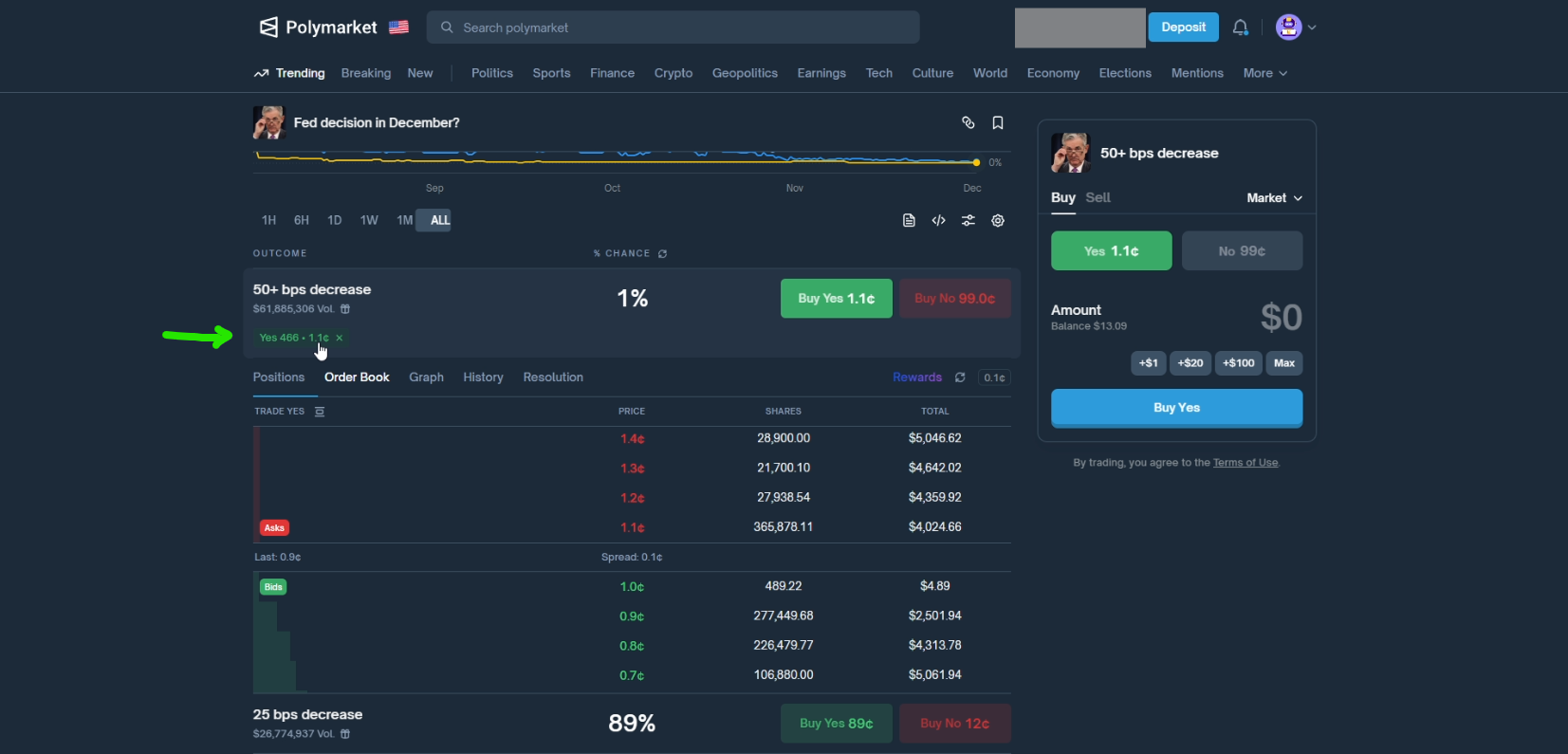
A single GET request to the Gamma API fetches the 10 most active markets, sorted by 24-hour trading volume:
response = requests.get(
    f"{GAMMA_API}/markets",
    params={
        "limit": 10,
        "active": True,
        "closed": False,
        "order": "volume24hr",
        "ascending": False
    }
)
markets = response.json()
print(f"Found {len(markets)} markets")
Each market object includes the question, current outcome prices, volume, liquidity, end date, and resolution criteria. Looping through the results gives a quick overview:
for m in markets[:5]:
    print(f"Question: {m['question']}")
    print(f"  Volume 24h: ${m.get('volume24hr', 0):,.0f}")
    print(f"  Liquidity: ${m.get('liquidityNum', 0):,.0f}")
    print(f"  Prices: {m.get('outcomePrices', 'N/A')}")
To work with a specific market, select it from the results and extract its token IDs. Polymarket uses a token-based system where each outcome (yes/no) has its own unique identifier. These tokens are what you'll reference when placing bets:
market = markets[1]
print(f"Market: {market['question']}")
print(f"End Date: {market['endDate']}")
print(f"Condition ID: {market['conditionId']}")

clob_token_ids = json.loads(market.get('clobTokenIds'))
yes_token_id = clob_token_ids[0]
no_token_id = clob_token_ids[1]
The yes token and no token are the foundation of every interaction that follows. Betting "yes" means buying yes tokens; betting "no" means buying no tokens. Prices are expressed as probabilities between 0 and 1, where 0.65 means the market assigns a 65% chance to that outcome.
Reading the Order Book
The order book shows all pending buy and sell orders for a given token, organised by price level. This is where you see real supply and demand rather than just the headline probability.
A read-only ClobClient (no authentication needed) gives access to the full book:
client = ClobClient(CLOB_API)

book = client.get_order_book(yes_token_id)

sorted_bids = sorted(book.bids, key=lambda x: float(x.price), reverse=True)
sorted_asks = sorted(book.asks, key=lambda x: float(x.price), reverse=False)

print("Top 5 Asks (sell orders):")
for ask in sorted_asks[:5]:
    print(f"  Price: {ask.price} | Size: {ask.size}")

print("Top 5 Bids (buy orders):")
for bid in sorted_bids[:5]:
    print(f"  Price: {bid.price} | Size: {bid.size}")
For automation or strategy development, you'll often need derived metrics rather than the raw book. The client provides these directly:
mid = client.get_midpoint(yes_token_id)
buy_price = client.get_price(yes_token_id, side="BUY")
sell_price = client.get_price(yes_token_id, side="SELL")
spread = client.get_spread(yes_token_id)

print(f"Midpoint: {mid['mid']}")
print(f"Best ask (buy at): {buy_price['price']}")
print(f"Best bid (sell at): {sell_price['price']}")
print(f"Spread: {spread['spread']}")
The spread (difference between best bid and best ask) tells you how much you'd lose on an immediate round trip. Tight spreads indicate liquid markets; wide spreads suggest you should be more careful with order placement and prefer limit orders.
Authenticating with Your Polymarket Wallet
Everything covered so far works without authentication. But now, placing orders requires connecting your wallet.
Polymarket runs on the Polygon network. Your wallet address and private key are needed to sign transactions. The signature type depends on how you created your account:
| Signature Type | Account Type |
|---|---|
| 0 | EOA wallet (MetaMask, hardware wallet) |
| 1 | Email / Magic wallet |
| 2 | Browser wallet proxy |
We'll use an email account (signature type 1), the simplest way to get started. To export your private key, navigate to your Polymarket account settings and select Private Key in the sidebar. Click Start Export, sign into Magic.Link, copy the displayed key, and log out. If you use a MetaMask or hardware wallet instead, export your private key directly from your wallet software and set the signature type accordingly.
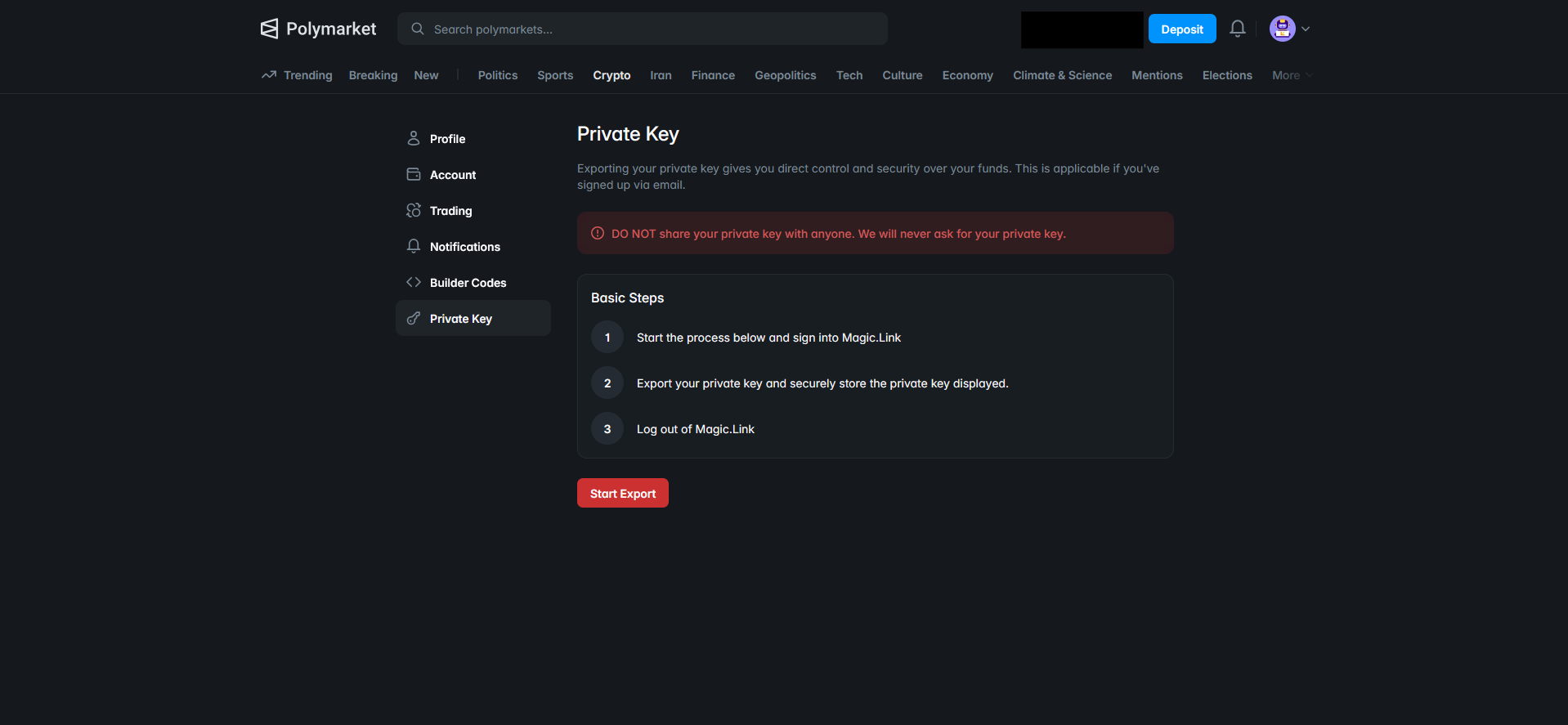
This key is confidential. It grants full access to your funds; never share it with anyone or any third party, commit it to a repository, or paste it into an AI assistant.
FUNDER_ADDRESS = "..."  # Your wallet address
PRIVATE_KEY = "..."     # Never share this

SIGNATURE_TYPE = 1      # Depends on your account type

auth_client = ClobClient(
    CLOB_API,
    key=PRIVATE_KEY,
    chain_id=137,
    signature_type=SIGNATURE_TYPE,
    funder=FUNDER_ADDRESS
)

creds = auth_client.derive_api_key()
auth_client.set_api_creds(creds)
The client uses your private key to derive API credentials specific to Polymarket. These derived keys handle the actual API communication, so your raw private key is not sent with every request.
To verify that authentication is working, check your balance:
balance = auth_client.get_balance_allowance(
    BalanceAllowanceParams(asset_type=AssetType.COLLATERAL)
)
usdc_balance = int(balance['balance']) / 1e6
print(f"USDC Balance: ${usdc_balance:.2f}")
If the balance displays your expected amount, authentication is configured correctly. Any misconfiguration (wrong key, wrong signature type) would produce an error at this stage.
Placing Orders: Market and Limit
Two order types cover most use cases: market orders for immediate execution and limit orders for targeting a specific price.
Market Orders
A market order spends a fixed dollar amount on yes or no tokens at the best price currently available. The FOK (Fill-or-Kill) type ensures the order either fills completely or gets cancelled, with no partial fills left hanging:
market_order = MarketOrderArgs(
    token_id=yes_token_id,
    amount=5.0,
    side=BUY,
    order_type=OrderType.FOK
)

signed_market_order = auth_client.create_market_order(market_order)
response = auth_client.post_order(signed_market_order, OrderType.FOK)
pprint(response)
Order placement always follows two steps: create_market_order signs it with your credentials, then post_order sends it to the exchange. A successful response returns "success": true along with the order ID and execution details.
Polymarket displays amounts in cents internally. A response showing 465 means $4.65 in USDC. Fees are deducted from the total, so the filled amount may differ slightly from your input.
Limit Orders
A limit order specifies both a price and a number of shares. The GTC (Good-Till-Cancelled) type keeps the order active until it fills or you cancel it manually:
limit_order = OrderArgs(
    token_id=yes_token_id,
    price=0.001,
    size=10.0,
    side=BUY
)

signed_order = auth_client.create_order(limit_order)
response = auth_client.post_order(signed_order, OrderType.GTC)
pprint(response)
A "status": "live" in the response confirms the order is sitting in the book, waiting for a match. You can verify this on the Polymarket web interface, where it appears under your open orders.
Managing and Cancelling Orders
Once orders are live, you need visibility into what's pending and the ability to pull orders back programmatically. The client exposes your open orders as a list, each carrying its ID, side, price, and size:
open_orders = auth_client.get_orders(OpenOrderParams())

for order in open_orders[:5]:
    print(f"ID: {order['id'][:20]}...")
    print(f"Side: {order['side']} | Price: {order['price']} | Size: {order['original_size']}")
Cancelling works at two levels of granularity. You can target a single order by its ID, or wipe the entire book in one call:
# Cancel a specific order
if open_orders:
    order_id = open_orders[0]["id"]
    result = auth_client.cancel(order_id)
    pprint(result)

# Cancel all open orders
result = auth_client.cancel_all()
pprint(result)
The cancel_all method doubles as a safety mechanism. If a bot encounters unexpected market conditions, clearing all pending orders prevents unwanted fills while you investigate.
Tracking Prices and Monitoring Positions
Fetching data and placing orders covers the core workflow. The two features below push further into automation territory: tracking prices over time and monitoring what other traders are doing.
Price Tracker
A simple polling loop tracks how a token's midpoint price evolves over time. This forms the basis for alert systems, conditional order placement, or any strategy that reacts to price movements:
def track_price(token_id, duration_seconds=30, interval=5):
    client = ClobClient(CLOB_API)
    start_time = time.time()
    prices = []

    while time.time() - start_time < duration_seconds:
        mid = client.get_midpoint(token_id)
        mid_price = float(mid['mid'])
        timestamp = time.strftime("%H:%M:%S")
        prices.append(mid_price)

        change = ""
        if len(prices) > 1:
            diff = prices[-1] - prices[-2]
            change = f" ({'+' if diff >= 0 else ''}{diff:.4f})"

        print(f"[{timestamp}] Price: {mid_price}{change}")
        time.sleep(interval)

    return prices
In production, you would extend this with conditional logic: place an order when the price crosses a threshold, send a notification when the spread widens, or log prices to a database for later analysis.
User Position Tracker
Polymarket's Data API exposes any user's open positions given their wallet address. This is public blockchain data, available without authentication:
def get_user_positions(wallet_address):
    url = f"{DATA_API}/positions"
    params = {"user": wallet_address}
    response = requests.get(url, params=params)
    return response.json()
You can find wallet addresses on Polymarket's leaderboard by navigating to a user's profile and copying their address. This opens up interesting possibilities: tracking successful traders' positions, building copy-trading alerts, or analysing market sentiment from large players' activity.
The complete notebook with all working code is available on GitHub. Every snippet in this article runs as-is once you fill in your credentials. The API surface covered here is a starting point; the py-clob-client repository documents additional methods for more advanced use cases.
Sources
- Polymarket, "Polymarket Documentation", 2025
- Polymarket, "py-clob-client", GitHub
- Polymarket, "Gamma API", market data endpoint
- Polymarket, "CLOB API", order book and trading endpoint
- Polymarket, "Data API", user positions and activity endpoint
- Robot Traders, "polymarket_python.ipynb", GitHub
- Robot Traders, "Polymarket API Python Tutorial: Fetch Data, Place Bets, and Track Prices", YouTube