
Pine Script Trailing Stop Loss: Two Methods for TradingView Strategies
Two methods to code a trailing stop loss in Pine Script: the built-in percentage approach and a custom indicator-based method for full control over your exits.
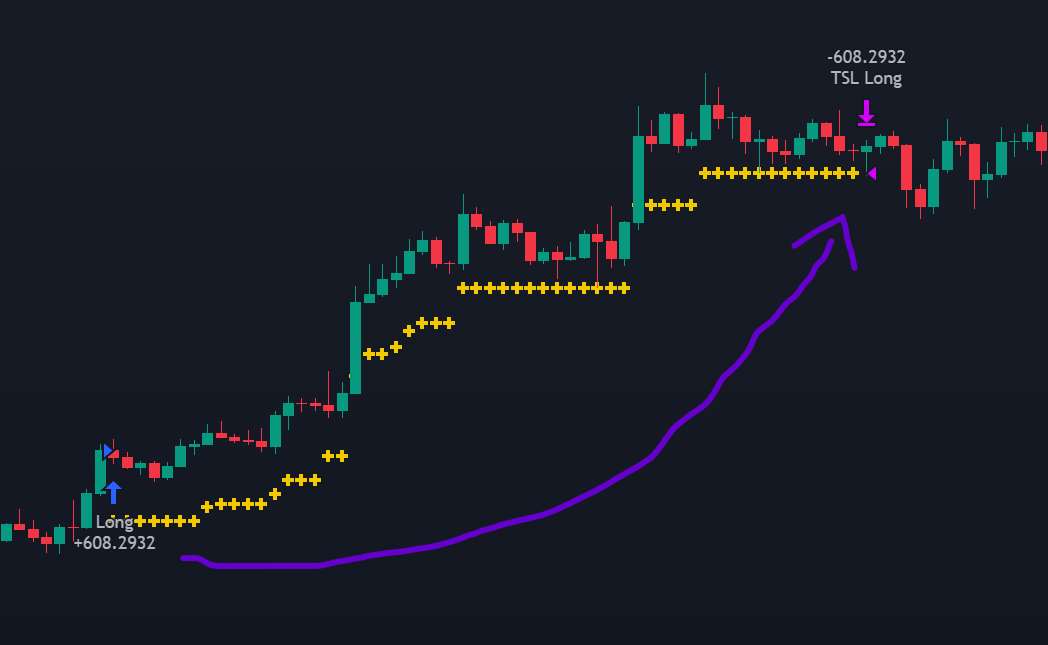
A fixed stop loss protects against catastrophic losses, but it cannot adapt to a trade that keeps moving in your favour. The position hits the take profit, closes, and the market continues running. Or the stop loss triggers on a brief pullback before the trend resumes. Both scenarios point to the same limitation: static exits ignore what the market is doing after entry.
A trailing stop loss addresses this by moving with the price. When the trade goes well, the stop follows. When the price reverses, the stop holds. The result is an exit mechanism that can capture more of a strong trend while still providing downside protection.
This flexibility comes with trade-offs. In choppy, sideways markets, a trailing stop tends to trigger on noise rather than genuine reversals, producing frequent premature exits. It also introduces lag by definition, since the stop only moves after the price has already advanced. A trailing stop loss is not a universal upgrade over fixed exits; it is a different tool suited to different market conditions.
Two methods exist for coding a trailing stop loss in Pine Script. The first uses built-in parameters in strategy.exit() for a quick, percentage-based implementation. The second calculates the trailing level manually, which allows indicator-based distances (such as ATR) and gives full control over the logic.
How a Trailing Stop Loss Works
Like a regular stop loss, a trailing stop loss is an exit order that closes a position when the price moves against it. The difference is that the exit level is not fixed at entry; it updates dynamically as the trade progresses.
The mechanism follows three steps:
- Define the trailing distance — The trader sets a distance from the current price, typically as a percentage or based on an indicator value.
- Automatic adjustment — As the price moves favourably (up for a long, down for a short), the stop level follows, maintaining the specified distance. If the price moves unfavourably, the stop stays where it is.
- Execution — When the price reverses enough to reach the stop level, the order triggers and the position closes.
The two most common approaches for defining the trailing distance are:
- Percentage offset — A fixed percentage below (long) or above (short) the most favourable price reached since entry
- Volatility-based offset — Using an indicator like the ATR to set the distance, so the stop adapts to market conditions
A Simple Strategy as Starting Point
To demonstrate both trailing stop loss methods, the same Bollinger Bands strategy from the stop loss and take profit guide serves as the foundation:
//@version=5
strategy('TSL Example', default_qty_type=strategy.percent_of_equity, default_qty_value=100, commission_type=strategy.commission.percent, commission_value=0.1, overlay=true)

// Indicator
bb_length = input(20, title="BB Length")
bb_mult = input(2, title="BB Multiplier")

bb_stddev = ta.stdev(close, bb_length)
bb_average = ta.sma(close, bb_length)

bb_upper = bb_average + bb_mult * bb_stddev
bb_lower = bb_average - bb_mult * bb_stddev

// Entry signals
entry_long = ta.crossover(close, bb_upper)
entry_short = ta.crossunder(close, bb_lower)
The entry logic is identical: go long when price crosses above the upper band, go short when it crosses below the lower band. The difference is entirely in how the exits are handled.
Method 1: The Built-In Approach
The simplest way to add a trailing stop loss in Pine Script uses two parameters built into strategy.exit(): trail_price and trail_offset. This method works well when you want a straightforward percentage-based trailing distance.
For a 5% trailing distance:
trail_percent = 0.05
tsl_offset = close * trail_percent / syminfo.mintick
tsl_price = close
The offset must be expressed in ticks (the smallest price increment for the asset), which is what syminfo.mintick provides. The tsl_price is the activation price for the trailing mechanism, not the execution price. TradingView calculates the actual execution price automatically based on tsl_offset.
With these values defined, the exit orders look like this:
if entry_long and strategy.position_size == 0
    strategy.entry("Long", strategy.long)
    strategy.exit("Long", trail_price = tsl_price, trail_offset = tsl_offset, comment_trailing = "TSL Long")

if entry_short and strategy.position_size == 0
    strategy.entry("Short", strategy.short)
    strategy.exit("Short", trail_price = tsl_price, trail_offset = tsl_offset, comment_trailing = "TSL Short")
The comment_trailing parameter displays a label on the chart when the trailing stop triggers, making it easy to visually verify that exits happen where expected.
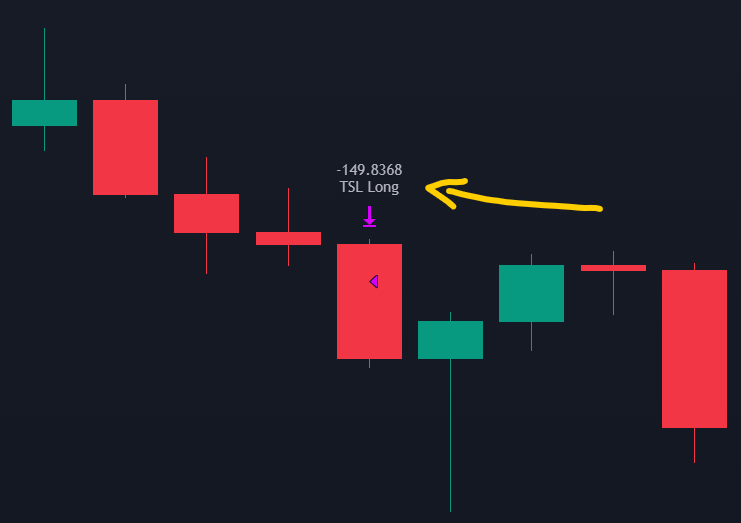
The strategy.position_size == 0 condition ensures new entries only happen when no position is currently open, preventing the strategy from stacking trades.
This method is fast to implement but limited to price-based offsets. If you need the trailing distance to adapt to volatility or follow an indicator, the next method provides that flexibility.
Method 2: An ATR-Based Trailing Stop Loss
When the trailing distance should reflect market volatility rather than a fixed percentage, calculating the stop level manually gives full control. The ATR (Average True Range) is a natural choice here: it measures recent price movement amplitude, so the trailing distance automatically widens in volatile conditions and tightens in calm ones.
The entries are set up independently from the exits, since the exit logic will run on every bar:
if entry_long and strategy.position_size == 0
    strategy.entry("Long", strategy.long)
if entry_short and strategy.position_size == 0
    strategy.entry("Short", strategy.short)
The trailing stop level is calculated as 3 times the ATR away from the close price:
atr_length = 14
atr = ta.atr(atr_length)
long_tsl = close - 3 * atr
short_tsl = close + 3 * atr
The core of a trailing stop loss is its update logic: the stop level should only move in the favourable direction and never retreat. For a long position, the stop can go up but never down. For a short, it can go down but never up.
In Pine Script, math.max and math.min handle this by comparing the current calculated level against the previous bar's stop price:
long_stop_price = 0.0
long_stop_price := if strategy.position_size > 0
    math.max(long_tsl, long_stop_price[1])
else
    0

short_stop_price = 0.0
short_stop_price := if strategy.position_size < 0
    math.min(short_tsl, short_stop_price[1])
else
    999999
For a long position, math.max(long_tsl, long_stop_price[1]) checks whether the new ATR-based level is higher than the previous stop. If the price moved up (favourably), long_tsl will be higher and the stop advances. If the price pulled back, long_tsl drops below the previous stop, and math.max keeps the old level. The logic is mirrored for shorts using math.min.
When no position is open, the values reset to their defaults (0 for long, 999999 for short) so they do not interfere with the next trade.
The exit orders use strategy.exit() with the stop parameter, updated on every bar:
if strategy.position_size > 0
    strategy.exit(id='TSL Long', stop=long_stop_price)

if strategy.position_size < 0
    strategy.exit(id='TSL Short', stop=short_stop_price)
Unlike the fixed stop loss (which must be placed inside the entry block), these exit calls run outside any entry condition because they need to update continuously. This is the correct behaviour for a trailing stop: the exit level should recalculate on every bar based on the latest price and ATR values.
Here is the complete strategy with Bollinger Bands and the trailing stop level plotted on the chart:
//@version=5
strategy('ATR Trailing Stop Example', overlay=true, default_qty_value=100, commission_value=0.1, default_qty_type=strategy.percent_of_equity, commission_type=strategy.commission.percent)

// Indicators
bb_length = 20
bb_mult = 2
atr_length = 14

atr = ta.atr(atr_length)
bb_stddev = ta.stdev(close, bb_length)
bb_average = ta.sma(close, bb_length)
bb_upper = bb_average + bb_mult * bb_stddev
bb_lower = bb_average - bb_mult * bb_stddev

// Entries
entry_long = ta.crossover(close, bb_upper)
entry_short = ta.crossunder(close, bb_lower)

if entry_long and strategy.position_size == 0
    strategy.entry("Long", strategy.long)
if entry_short and strategy.position_size == 0
    strategy.entry("Short", strategy.short)

// Trailing stop loss levels
long_tsl = close - 3 * atr
short_tsl = close + 3 * atr

// Update stop only in the favourable direction
long_stop_price = 0.0
long_stop_price := if (strategy.position_size > 0)
    math.max(long_tsl, long_stop_price[1])
else
    0

short_stop_price = 0.0
short_stop_price := if (strategy.position_size < 0)
    math.min(short_tsl, short_stop_price[1])
else
    999999

// Exit orders
if strategy.position_size > 0
    strategy.exit(id='TSL Long', stop=long_stop_price)

if strategy.position_size < 0
    strategy.exit(id='TSL Short', stop=short_stop_price)

// Plots
plot(bb_upper, color=color.new(#ffb13b, 0), linewidth=2)
plot(bb_average, color=color.new(#b43bff, 0), linewidth=2)
plot(bb_lower, color=color.new(#ffb13b, 0), linewidth=2)
plot(series=strategy.position_size > 0 ? long_stop_price : na, color=color.rgb(49, 122, 241), style=plot.style_cross, linewidth=3)
plot(series=strategy.position_size < 0 ? short_stop_price : na, color=color.rgb(49, 122, 241), style=plot.style_cross, linewidth=3)
The last two plot calls draw the trailing stop level as blue crosses on the chart, but only while a position is open. This makes it easy to see how the stop follows the price during a trend and holds still during pullbacks.
When to Use (and Not Use) a Trailing Stop Loss
The trailing stop loss is popular and visually satisfying: watching the stop follow a strong trend feels like the ideal exit strategy. In practice, its effectiveness is limited to specific market conditions.
In trending markets, a trailing stop can outperform fixed stop loss and take profit combinations by staying in the trade as long as the trend continues. The exit happens only when the trend actually reverses, which can capture significantly more profit than a predetermined take profit level.
In sideways or choppy markets, the picture changes. Volatility spikes trigger the stop on noise rather than genuine reversals, producing a sequence of premature exits and re-entries that erode the account through transaction costs. The trailing mechanism has no way to distinguish between a true reversal and a temporary pullback; it reacts to price distance alone.
The choice between a fixed stop loss with take profit and a trailing stop should depend on the strategy's logic and the market regime it targets, not on which method sounds better in theory. Both are tools with clear strengths and clear limitations. Testing both on historical data for the specific strategy and asset remains the most reliable way to decide.