
Pine Script Stop Loss and Take Profit: Complete Coding Guide
Learn how to implement stop loss and take profit orders in Pine Script using strategy.exit(), with percentage-based levels and risk-reward ratio examples.
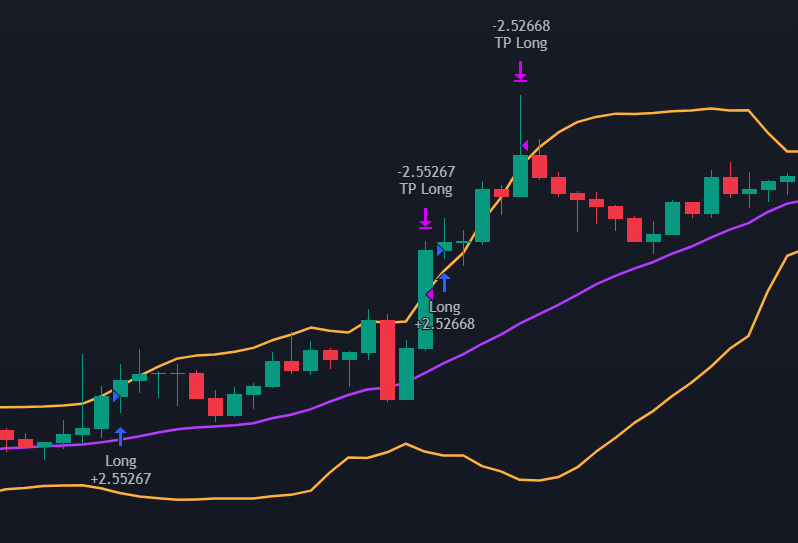
Pine Script Stop Loss and Take Profit: Complete Coding Guide
A trade moves in your favour, profits accumulate on the chart, and then the market reverses. Without a predefined exit, those gains evaporate in minutes. This scenario is one of the most common frustrations in trading, and the solution is straightforward: define your exits before you enter.
Stop loss and take profit orders are the most direct tools for managing risk on any trade. A stop loss closes your position when the price moves against you beyond a threshold you set in advance. A take profit locks in gains when the price reaches a target level. Together, they form the foundation of disciplined position management.
Implementing these orders in Pine Script on TradingView is not complicated, but there are a few subtleties that trip up beginners. This guide walks through the logic, the code, and the common mistakes to avoid.
What Are Stop Loss and Take Profit Orders?
What distinguishes a stop loss and a take profit from a regular order is that they are exclusively exit orders, typically placed at the same time as the position entry. In practice, they translate to a limit order (for the take profit) or a trigger/stop order (for the stop loss).
The price at which each order executes depends on the direction of your position:
- For a long position, the stop loss sits below the entry price and the take profit sits above it
- For a short position, the stop loss sits above the entry price and the take profit sits below it
The execution price is the only parameter you need to choose. Three common approaches exist for setting it:
- Percentage offset — A fixed percentage away from the entry price. Simple and predictable.
- Indicator-based offset — A distance determined by an indicator such as the Average True Range (ATR), which adapts to the asset's volatility.
- Direct indicator value — The exit price equals the value of an indicator (a Supertrend line, a moving average) at the time of entry.
This guide focuses on the percentage approach to keep the implementation clear, but the same strategy.exit() function handles all three.
A Simple Strategy to Work With
The goal here is to understand how to implement stop loss and take profit orders, not to build a production-ready strategy. To keep the focus on exits, the entry logic will be as simple as possible, using Bollinger Bands for both long and short signals.
//@version=5
strategy('TP/SL Example', default_qty_type=strategy.percent_of_equity, default_qty_value=100, commission_type=strategy.commission.percent, commission_value=0.1, overlay=true)

// Indicator
bb_length = input(20, title="BB Length")
bb_mult = input(2, title="BB Multiplier")

bb_stddev = ta.stdev(close, bb_length)
bb_average = ta.sma(close, bb_length)

bb_upper = bb_average + bb_mult * bb_stddev
bb_lower = bb_average - bb_mult * bb_stddev

// Entry signals
entry_long = ta.crossover(close, bb_upper)
entry_short = ta.crossunder(close, bb_lower)
The header declares Pine Script version 5 and configures the strategy to enter with 100% of equity on each trade, with a 0.1% commission. The Bollinger Bands parameters (length and multiplier) are defined with input() so they can be adjusted directly on the TradingView chart.
The entry signals use two functions from Pine Script's built-in ta library:
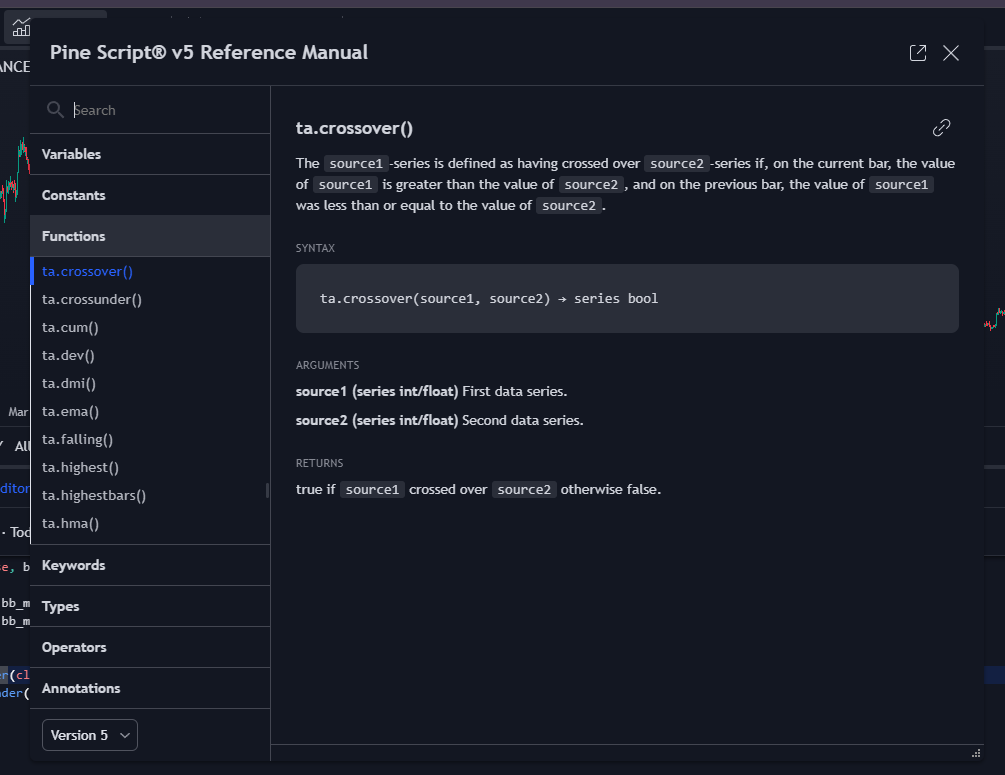
entry_longbecomestruewhen the price crosses above the upper Bollinger Band (ta.crossover)entry_shortbecomestruewhen the price crosses below the lower Bollinger Band (ta.crossunder)
You can Ctrl+click on any built-in function in the Pine Editor to open its documentation panel, which shows the function signature, parameters, and return type.
Coding a Stop Loss in Pine Script
For a percentage-based stop loss, the calculation is straightforward. With a 5% offset from the entry price:
entry_price = close
percent_diff = 5.0

stop_loss_price_long = (1 - percent_diff / 100) * entry_price
stop_loss_price_short = (1 + percent_diff / 100) * entry_price
The long stop loss sits below the entry price, so the sign is negative. The short stop loss sits above, so the sign is positive. With these levels calculated, the exit orders use strategy.exit():
if entry_long
    strategy.entry("Long", strategy.long)
    strategy.exit("SL Long", "Long", stop = stop_loss_price_long, comment_loss = "SL Long")

if entry_short
    strategy.entry("Short", strategy.short)
    strategy.exit("SL Short", "Short", stop = stop_loss_price_short, comment_loss = "SL Short")
The stop loss price goes in the stop parameter of strategy.exit(). The first two string arguments are identifiers: the first names this exit order, the second references the entry it should close. Adding comment_loss displays a label on the chart when the stop loss triggers.
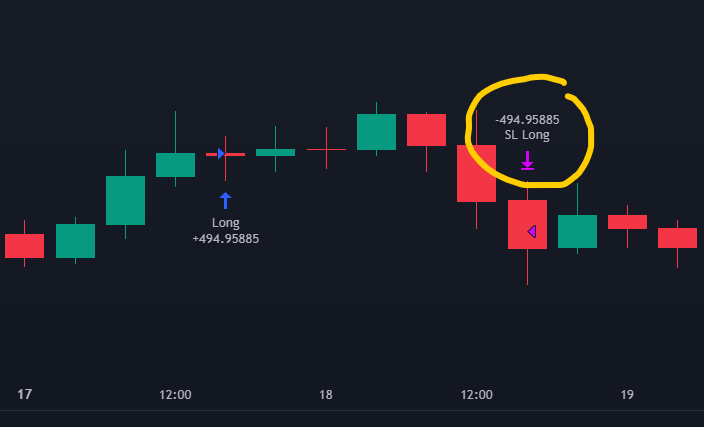
A critical detail: the strategy.exit() call must be placed inside the same if block as strategy.entry(), at the same indentation level. This ensures the stop loss price is calculated and locked in at the moment of entry.
Placing it outside the condition block changes the behaviour entirely:
if entry_long
    strategy.entry("Long", strategy.long)

strategy.exit("SL Long", "Long", stop = stop_loss_price_long, comment_loss = "SL Long")
In this version, strategy.exit() runs on every bar, which means the stop loss price recalculates continuously instead of staying fixed at the level set when the position opened. This is a different mechanism altogether. If you want a stop that follows price movement, that requires a trailing stop loss implementation.
Coding a Take Profit in Pine Script
The take profit follows the same pattern but with inverted signs. Where the stop loss protects against adverse movement, the take profit captures gains in the expected direction:
entry_price = close
percent_diff = 10.0

take_profit_price_long = (1 + percent_diff / 100) * entry_price
take_profit_price_short = (1 - percent_diff / 100) * entry_price
The long take profit sits above the entry (positive sign), and the short take profit sits below (negative sign). The exit implementation uses the limit parameter instead of stop, and comment_profit instead of comment_loss:
if entry_long
    strategy.entry("Long", strategy.long)
    strategy.exit("TP Long", "Long", limit = take_profit_price_long, comment_profit = "TP Long")

if entry_short
    strategy.entry("Short", strategy.short)
    strategy.exit("TP Short", "Short", limit = take_profit_price_short, comment_profit = "TP Short")
The same placement rule applies: keep the strategy.exit() inside the entry condition block to lock the take profit price at entry time.
Combining Stop Loss, Take Profit, and Risk-Reward Ratio
Pine Script allows you to specify both a stop loss and a take profit in a single strategy.exit() call by providing both the stop and limit parameters together.
Many traders prefer to set the take profit level based on a risk-reward ratio rather than a fixed percentage. If the risk-reward ratio is 2:1, the distance between the entry price and the take profit should be twice the distance between the entry price and the stop loss. In code:
entry_price = close
percent_diff = 5.0
risk_reward_ratio = 2

stop_loss_price_long = (1 - percent_diff / 100) * entry_price
stop_loss_price_short = (1 + percent_diff / 100) * entry_price

take_profit_price_long = entry_price + (entry_price - stop_loss_price_long) * risk_reward_ratio
take_profit_price_short = entry_price - (stop_loss_price_short - entry_price) * risk_reward_ratio
Putting everything together into a complete, runnable strategy with Bollinger Bands plotted on the chart:
//@version=5
strategy('TP/SL Example', default_qty_type=strategy.percent_of_equity, default_qty_value=100, commission_type=strategy.commission.percent, commission_value=0.1, overlay=true)

// Indicator
bb_length = input(20, title="BB Length")
bb_mult = input(2, title="BB Multiplier")

bb_stddev = ta.stdev(close, bb_length)
bb_average = ta.sma(close, bb_length)

bb_upper = bb_average + bb_mult * bb_stddev
bb_lower = bb_average - bb_mult * bb_stddev

// Entry signals
entry_long = ta.crossover(close, bb_upper)
entry_short = ta.crossunder(close, bb_lower)

// Stop loss and take profit levels
entry_price = close
percent_diff = 5.0
risk_reward_ratio = 2

stop_loss_price_long = (1 - percent_diff / 100) * entry_price
stop_loss_price_short = (1 + percent_diff / 100) * entry_price

take_profit_price_long = entry_price + (entry_price - stop_loss_price_long) * risk_reward_ratio
take_profit_price_short = entry_price - (stop_loss_price_short - entry_price) * risk_reward_ratio

// Entries and exits
if entry_long
    strategy.entry("Long", strategy.long)
    strategy.exit("TP/SL Long", "Long", stop = stop_loss_price_long, limit = take_profit_price_long, comment_loss = "SL Long", comment_profit = "TP Long")

if entry_short
    strategy.entry("Short", strategy.short)
    strategy.exit("TP/SL Short", "Short", stop = stop_loss_price_short, limit = take_profit_price_short, comment_loss = "SL Short", comment_profit = "TP Short")

// Plots
plot(bb_upper, color=color.rgb(31, 130, 252), linewidth=2)
plot(bb_average, color=color.new(#ffb13b, 0), linewidth=2)
plot(bb_lower, color=color.rgb(31, 130, 252), linewidth=2)
Adding this strategy to a TradingView chart produces entry and exit labels at each trade, along with access to TradingView's backtesting tools (performance summary, trade list, equity curve).
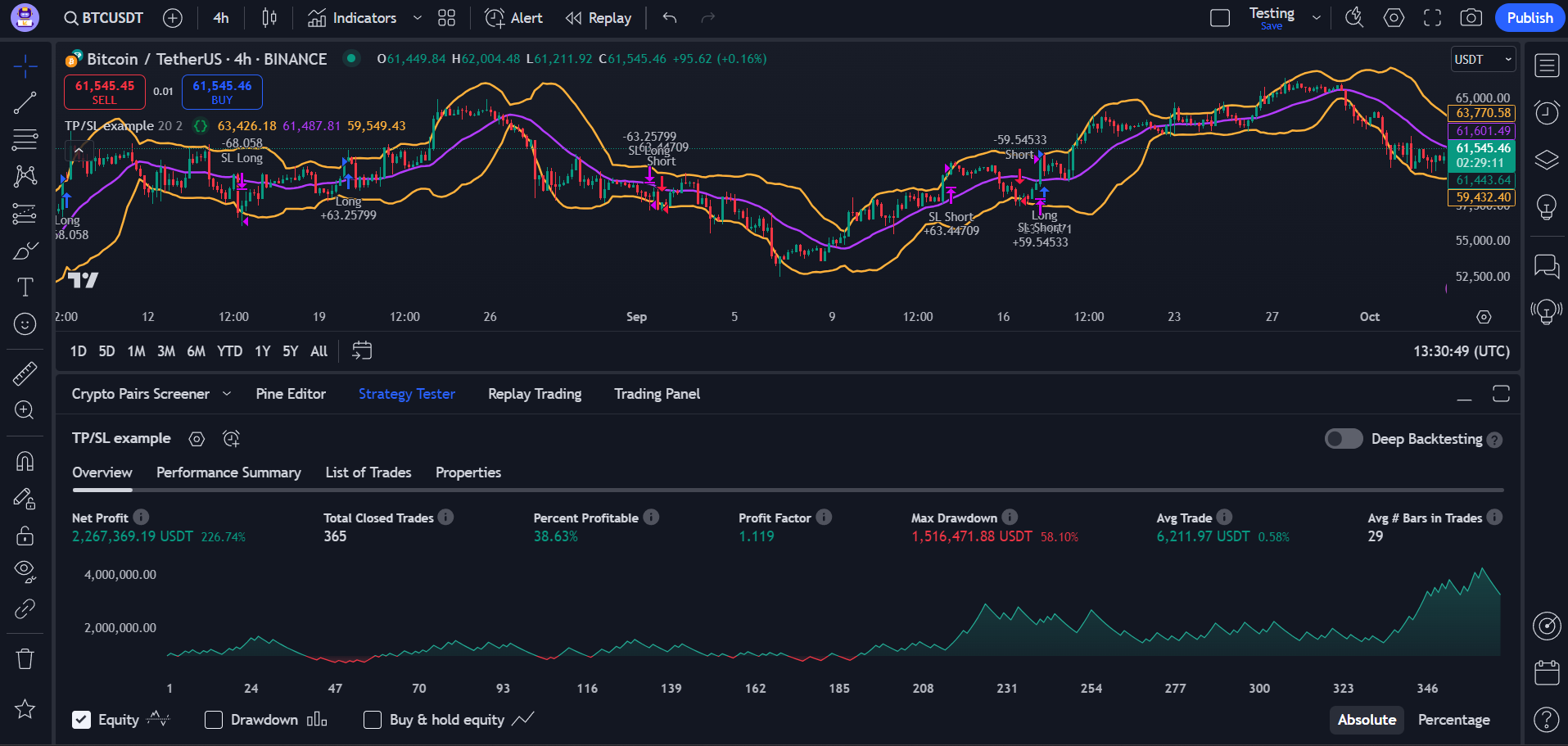
This was a simplified example designed to teach the mechanics of coding stop loss and take profit orders in Pine Script. A production strategy requires significantly more testing and validation before risking real capital. The parameters shown here are starting points for learning, not trading recommendations.
For a dynamic exit that follows price movement instead of staying fixed, a trailing stop loss is the next step. It adjusts automatically as the trade moves in your favour while holding firm when the price pulls back.