
Demo Trading with Python: Test Your Crypto Bot Risk-Free
How to set up demo trading with Python and CCXT to test your crypto bot risk-free, with code examples for the Bitget sandbox API.

The backtest looks solid. Risk parameters are tuned, the equity curve slopes upward, and the strategy handles drawdowns within acceptable bounds. Then comes the question that separates simulation from reality: is this bot ready for real money?
Even with thorough backtesting and parameter optimisation, the distance between a historical simulation and a live trading bot is wider than most traders expect. Slippage, API latency, partial order fills, and exchange-specific behaviour all affect execution in ways that backtesting simply cannot reproduce. A strategy that looked profitable on historical data may stumble when it meets a real order book.
Demo trading (also called paper trading) fills this gap. It runs your bot against live market data through the exchange's actual API, using virtual funds instead of real capital. No money at risk, no fees burned on failed experiments. For anyone building a crypto trading bot, this is the last validation layer before going live.
What Demo Trading Catches That Backtesting Misses
Backtesting evaluates how a strategy would have performed on past data. Demo trading answers a fundamentally different question: does this bot work correctly as production code?
A backtest assumes ideal conditions. Orders fill instantly at the expected price, API calls always succeed, and the code handles every possible scenario. In practice, none of these hold reliably. An order might be rejected because margin is insufficient. An API response might contain an unexpected error code. A position might fill partially, leaving the bot in a state it was never designed for.
Demo trading exposes these failure points before they become expensive. It validates three categories of issues that a backtest cannot touch:
- Order execution — Does the bot send the correct order type, size, and parameters? Does it handle partial fills and rejections?
- API integration — Do authentication, rate limits, and error responses work as expected? Does the connection stay stable over hours?
- Real-time behaviour — Does the strategy react the same way when processing one candle at a time, rather than having the full price history available at once?
The point is not to re-evaluate profitability. The backtest already covered that. Demo trading exists to surface implementation bugs in an environment where mistakes are free.
Spot and futures trading with top-tier liquidity and low fees 10% discount on trading fees
Setting Up Demo Trading on Bitget
Several exchanges offer paper trading environments. Bitget provides one that mirrors its perpetual futures markets with virtual funds, making it a practical option for testing bots that trade crypto derivatives.
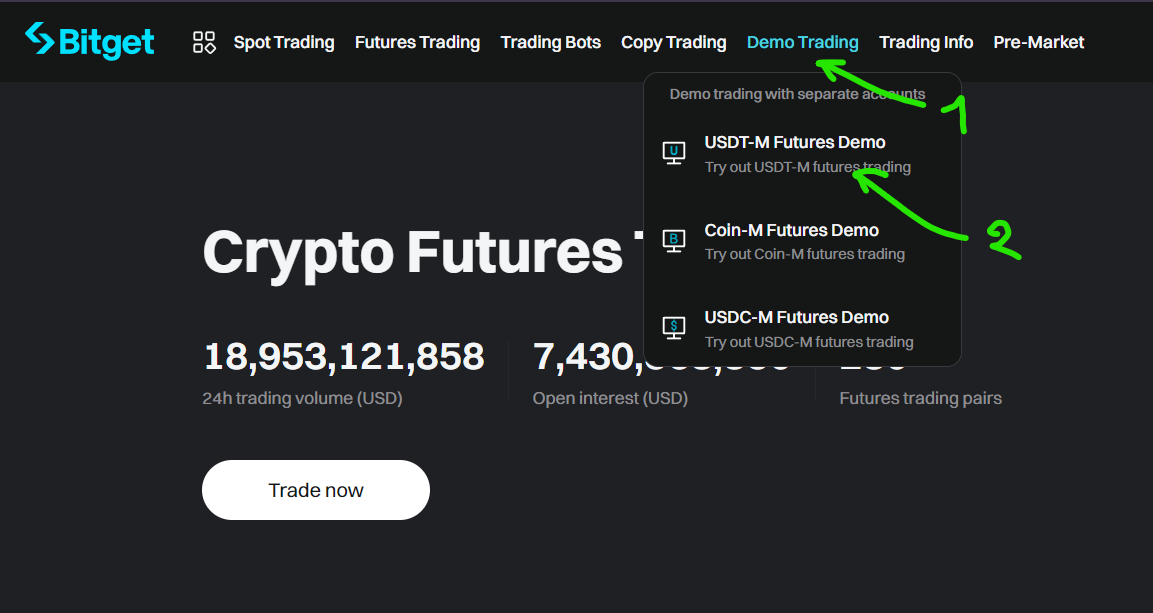
Activating demo mode takes a few clicks. On the Bitget homepage, click Demo Trading in the top navigation bar and select USDT-M Futures Demo.
Bitget distinguishes demo assets with an "S" prefix: SBTC, SETH, SEOS, and SXRP are the virtual equivalents of BTC, ETH, EOS, and XRP. Each demo account starts with 3,000 SUSDT (virtual USDT) for testing. No sub-account or special permission is required.
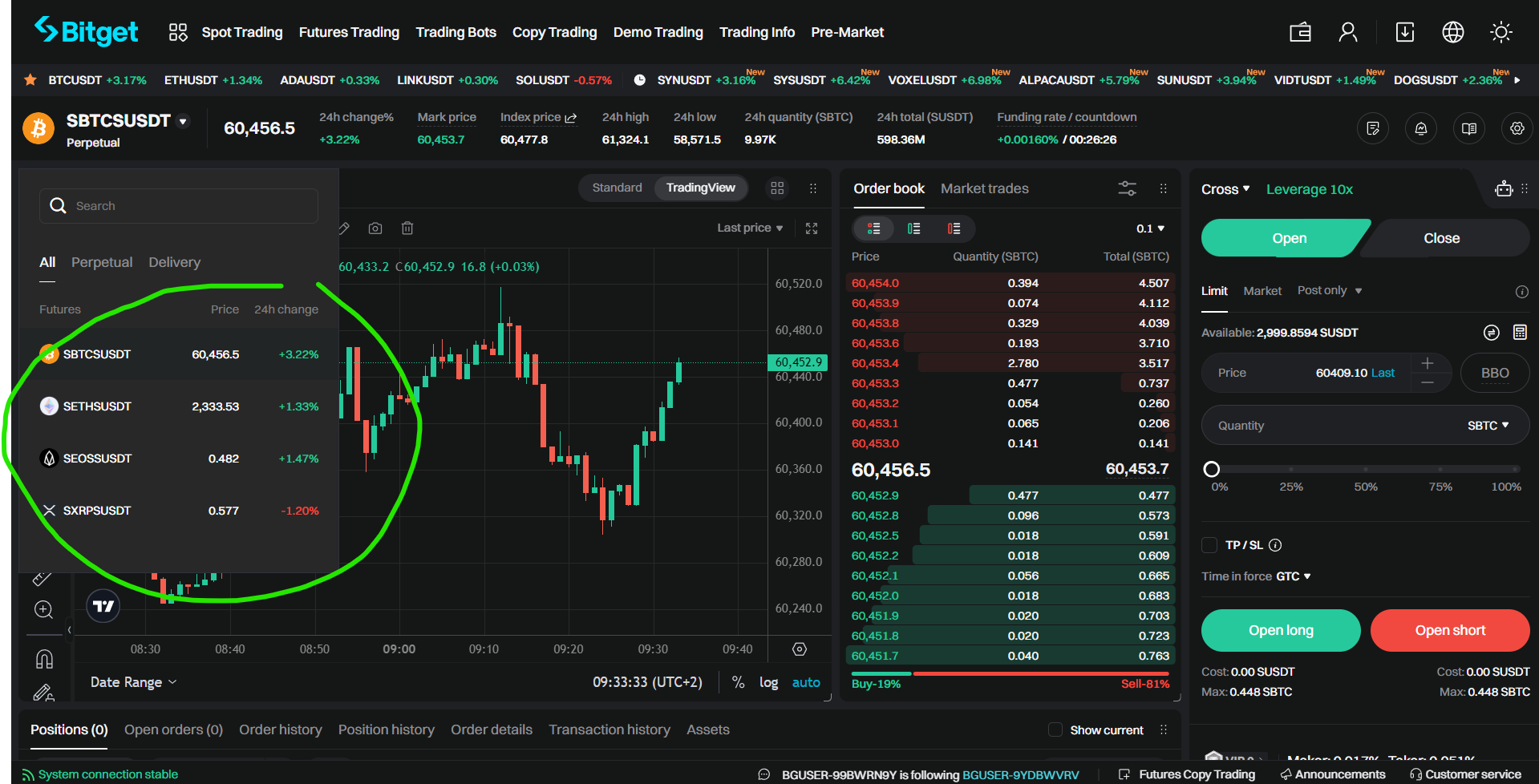
The demo environment uses the same API keys as your live account. The separation between live and demo happens entirely at the API level through a product type parameter. Your bot's configuration controls where orders are routed, with no manual switching needed once the connection is set up.
Connecting to the Demo API with CCXT
ccxt is an open-source Python library that provides a unified interface to more than 100 cryptocurrency exchanges. It handles authentication, request signing, endpoint naming, and data formatting behind a consistent API. Building your trading logic with ccxt means you can develop against one exchange and switch to another later without rewriting your order management code.
Configuring ccxt for Bitget's demo environment requires two settings: the product type must be set to SUSDT-FUTURES, and sandbox mode must be enabled. Together, these route all API calls to the demo environment:
import ccxt

exchange = ccxt.bitget({
    "apiKey": "...",
    "secret": "...",
    "password": "...",
    "options": {
        "defaultType": "future",
        "productType": "SUSDT-FUTURES",
    },
})

exchange.set_sandbox_mode(True)
These are your standard Bitget API credentials, the same ones used for live trading. The sandbox flag is what prevents real orders from being placed. Keep these credentials confidential and never include them in source code committed to a repository. Environment variables or a local configuration file excluded from version control are the standard approaches.
Checking Your Demo Balance
Before placing orders, verify that authentication works and the bot connects to the correct environment:
balance = exchange.fetch_balance()["SUSDT"]
print(balance)
Expected output:
{'free': 3000.0, 'used': 0.0, 'total': 3000.0}Seeing 3,000 SUSDT confirms two things: the API credentials are valid, and sandbox routing is active. If this call returns an error, the most common causes are incorrect credentials or a typo in the product type. If it returns a balance matching your live account instead of the expected 3,000, the sandbox flag is not being applied. Stop and fix the configuration before placing any orders.
Placing and Closing Demo Orders
Placing a demo order uses the same ccxt methods as a live trade. The only difference the code sees is the symbol: demo pairs carry the "S" prefix (SETH/SUSDT:SUSDT instead of ETH/USDT:USDT).
Opening a long position with a market buy:
symbol = "SETH/SUSDT:SUSDT"

order = exchange.create_order(symbol, "market", "buy", 0.01)
info = exchange.fetch_order(order["id"], symbol)
print(info)
The order fills at the current market price and a position appears on the Bitget demo interface. The info dictionary contains all execution details: fill price, fees, timestamp, and order status.
Closing the position requires one additional parameter. Setting reduceOnly to True tells the exchange to reduce an existing position rather than open a new one in the opposite direction:
close = exchange.create_order(
    symbol, "market", "sell", 0.01,
    params={"reduceOnly": True},
)
info = exchange.fetch_order(close["id"], symbol)
print(info)
This flag is easy to overlook but critical to get right. Without reduceOnly, a sell order against an existing long does not close the long. It opens a separate short position, doubling your market exposure instead of neutralising it. In a live environment, that mistake leads to rapid, unintended losses.
What to Validate During Demo Testing
Running a few manual orders confirms the API connection works. Testing a bot properly requires a more systematic approach over a longer period.
Order lifecycle: place different order types (market, limit) and verify that each step (submission, fill, cancellation) produces the expected state in your bot. Confirm that your code reads back the actual fill price, not the requested price, as these can differ for market orders.
Error handling: deliberately trigger errors by placing invalid orders (wrong symbol, invalid size) and verify your bot handles the failure without crashing or entering an inconsistent state.
Position tracking: open and close several positions in sequence, checking that your bot's internal state matches the exchange's reported positions after each trade. Drift between local state and exchange state is one of the most common sources of bugs in production bots.
Extended runs: let the bot run for at least a few full trading sessions. Many bugs only surface during sustained operation: memory leaks, reconnection failures after a dropped connection, or edge cases at candle boundaries. A bot that works for five minutes may fail after five hours.
The goal is not a specific number of trades but confidence that the bot handles every situation it will encounter in production.
From Demo to Live: Three Changes
Switching from demo to live trading requires exactly three modifications in the code:
- Remove
set_sandbox_mode(True)to route orders to the production environment - Change the product type from
SUSDT-FUTUREStoUSDT-FUTURES - Drop the "S" prefix from symbols (
SETH/SUSDT:SUSDTbecomesETH/USDT:USDT)
The trading logic, error handling, and position management remain identical. This is the core benefit of demo trading through the same API: the code you tested is the code you deploy. No translation layer, no guesswork about whether the live version will behave differently.
One caution: even after thorough demo testing, start live with small position sizes. Demo environments do not fully replicate slippage on larger orders, and the absence of real financial risk changes how you experience drawdowns. A bot can be technically correct and still feel different when real capital is at stake. Scale up gradually as the bot demonstrates consistent behaviour in production.
Spot and futures trading with top-tier liquidity and low fees 10% discount on trading fees
What Demo Trading Can and Cannot Tell You
No test environment can guarantee live profitability. Market conditions shift, demo execution does not perfectly replicate real liquidity, and trading virtual money removes the psychological pressure that affects real decision-making. A strategy that works in demo may still underperform live.
That said, demo trading is far more than a code check. A strategy that consistently loses money in demo, where conditions are close to live, has virtually no chance of improving with real capital behind it. Demo testing filters out clearly unprofitable approaches early, surfaces red flags in execution logic, and builds justified confidence in strategies that do perform. Like any form of forward testing, it cannot promise results, but it shortens the path from "this might work" to "this is worth deploying".
What it guarantees is that your bot works as intended at the technical level. Orders route correctly, positions close when they should, and API interactions behave predictably. Combined with the strategic signal it provides, demo trading is the most efficient way to decide whether a strategy deserves real capital.
This article contains affiliate links. If you sign up through these links, we may earn a commission at no additional cost to you.